

A Mobile App Built for Field Service
Stay Connected and Work Faster From Anywhere
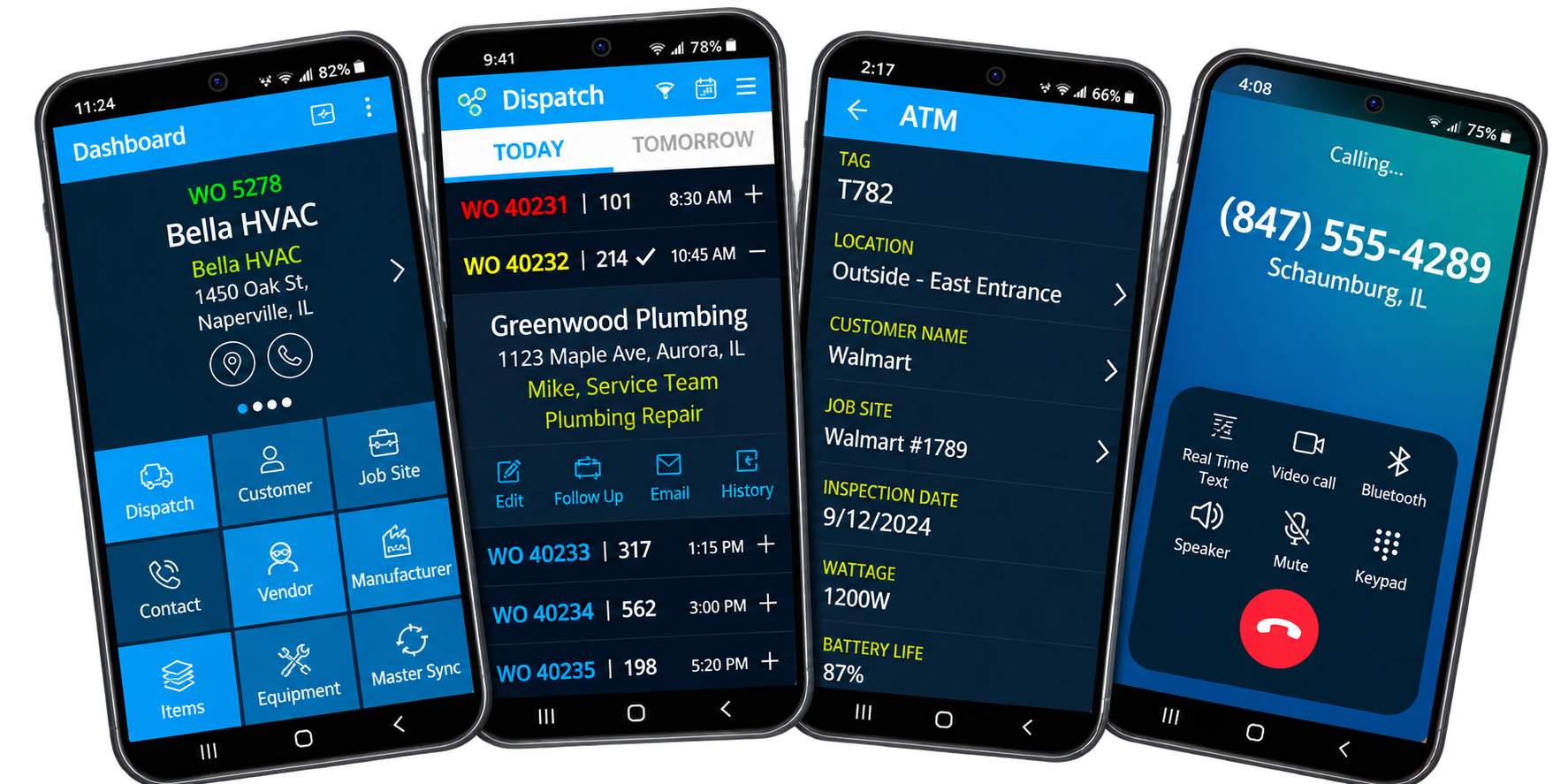
Your team is always on the move, and Optsy’s mobile field service app keeps your business moving with them. Technicians can create quotes, update work orders, collect payments, and capture customer signatures directly from the job site using any iOS or Android device.
Instead of waiting until they return to the office, technicians can provide customers with accurate quotes, generate invoices, and collect signatures and payments as soon as the job is complete. Everything syncs back to the office in real time, reducing duplicate data entry, preventing billing delays, and ensuring no important job details are missed.
The app puts your full field service management system in the palm of your hand. Work orders, scheduling, inventory levels, and equipment details are all there, and anything the office updates appears on the technician’s device, which cuts out the calls back and forth. Because it’s fully integrated with the rest of the platform, every action in the field connects to scheduling, dispatching, inventory, invoicing, and reporting. Fewer mistakes, no re-entry, and no reconciling notes.
What’s Included in Optsy’s Mobile Field Service App
Everything a technician needs between pulling into the driveway and pulling out of it.
Customer Records & History
Technicians have instant access to complete customer profiles, service agreements, equipment details, and full service history, including past work orders, maintenance notes, and warranty terms. They can review records before arriving and update them on site, and every change syncs to the office so dispatch, accounting, and management are working from current information.
Work Orders & Real-Time Job Updates
Create and manage work orders in the app, add photos and notes, and move job status to in progress, paused, or done as the work happens. Changes sync with scheduling, accounting, and reporting, giving dispatchers a real time view of progress so they can reassign work and keep customers informed.
Invoicing, Estimates & Payments
Technicians build estimates using the integrated price book, present them for digital approval, and convert them to invoices as soon as the work is done. Secure credit card processing lets customers pay on the spot, and every charge, labor, materials, and any changes made on site, flows straight to accounting.
Service Agreement Management
Contract terms, scheduled maintenance dates, included services, and special pricing all live in the app. As work is performed, hours and materials are logged to the correct agreement and invoices apply the contract’s terms. Renewals, warranty work, and special billing rules can be updated on the spot.
Photos, Checklists & Notes
Technicians take photos, complete inspection or safety checklists, and add job notes or change orders without leaving the site. Everything is time-stamped and stored in the work order, which gives you a complete record for the customer and for your own quality control.
Time & Materials Tracking
Labor hours and materials are logged as the work happens, with no paper sheets and no data entry afterward. Those updates feed payroll, job costing, and inventory, so labor charges are accurate and material counts stay current.
Inventory Access
Technicians check stock levels, reserve parts, or raise purchase orders from the app. As parts are used, inventory updates, so the next job isn’t delayed waiting on something nobody knew had run out.
Equipment Visibility & Location
Every piece of equipment under a service agreement is visible on the technician’s device, with location, service history, and warranty details. Records can be updated while servicing the unit, which means correct part selection now and complete documentation for the next visit.
How the Mobile App Works With the Rest of Optsy
The app writes to the same records the office is working from. A part logged at eleven in the morning shows in stock levels at 11:01, and a job closed in a driveway is invoiceable before the technician reaches the next one.
Scheduling & Dispatching
Assigned jobs appear on the technician’s phone through scheduling and dispatching, with job details and customer history attached. Dispatchers watch progress live and reroute without making a call. When an emergency comes in, the closest available technician gets it while they are still at the previous stop.
Work Order Management
Technicians open, update, and close jobs through work order management, attaching photos, notes, and a customer signature. The office sees a finished job within minutes rather than the next morning. That is what makes same-day invoicing possible instead of a Friday catch-up.
Inventory Management
Technicians check stock, reserve parts, and raise purchase orders through inventory management without calling the warehouse. Parts used draw down counts as they are logged, so the numbers stay accurate through the day. Nobody drives to a branch for something that was already taken this morning.
Service Agreements
Coverage terms and special pricing from service agreements apply on site, so covered work is recognized as covered before anyone bills it. Technicians see what the contract includes and what falls outside it. That prevents both charging for covered work and absorbing work that should have been billed.
Employee & Technician Management
Hours logged in the app feed employee and technician management, so payroll runs on recorded time instead of reconstructed time. Job durations are captured as the work happens. Over a few weeks you can see how long jobs really take against how long they were quoted.
Reporting & Analytics
Job times, parts used, and completion data captured on the phone feed reporting software. The numbers describe what happened on site, not what someone remembered later. That is the difference between knowing a job lost money and guessing it did.
Equipment Tracking
Specifications, past repairs, and warranty status come from equipment tracking while the technician is standing at the unit. What they log goes straight back onto the asset record. The next person sent to that equipment starts with the real history instead of a one-line note.
Task Management
Assigned steps arrive through task management and close as the technician finishes them. The office sees where a job actually stands, step by step. A job waiting on a part looks different from a job nobody has started.
CRM & Customer Records
Full account history from your field service CRM is available before the technician knocks. Anything recorded on site updates the account immediately. Whoever takes the next call from that customer already knows what happened.
QuickBooks Integration
Payments taken in the field and invoices generated on site sync to QuickBooks, so cash flow and the books both reflect the day’s work. Nobody enters the same figures twice. Month-end stops being a reconciliation exercise.
Customization
Custom fields and forms built through customizable FSM software appear in the app exactly as configured. Technicians capture what your trade actually tracks, from refrigerant amounts to gate codes. The data your office needs arrives complete the first time.
Map Routing
Directions and route order come from map routing software, so a technician heading to the next job has the fastest way there. Current traffic is factored in rather than assumed. Less time driving means another call fits in the day.
How the Mobile App Helps Your Industry
What a technician needs in hand changes by trade. Equipment histories, wiring details, temperature readings, before-and-after photos. Here is what the app looks like across the trades Optsy serves.
HVAC Software
Complex equipment and seasonal maintenance mean the history matters as much as the call. Technicians using Optsy’s HVAC software see equipment histories, service notes, and warranty details before arriving, then record refrigerant usage, order parts, and take payment once the job is done.
Plumbing Software
Photos of a repair are worth more than a paragraph describing it. Optsy’s plumbing software lets technicians capture images, log parts used, and invoice without leaving the property, while dispatchers send the nearest person to an emergency and watch the status change in real time.
Electrical Contractor Software
Documentation and scope changes define the trade. Technicians working in Optsy’s electrical contractor software review schematics, record safety checks, and add notes on site, and when a customer asks for extra work the job and the billing both update.
Refrigeration Software
Readings and records are the job, not the paperwork after it. Optsy’s refrigeration software lets technicians log equipment readings, document maintenance, and produce reports in the field, with part replacements and warranty updates syncing immediately.
Roofing Software
Before-and-after photos and material quantities decide what gets billed. Crews using Optsy’s roofing software upload both from the rooftop, and the invoice can be generated before anyone climbs down.
Alarm & Security Software
Testing results and firmware logs need recording while the panel is still open. Optsy’s alarm and security software captures system checks, takes a signature, processes payment, and creates a new work order on the spot if more work is needed.
Computer & IT Service Software
A technician arriving at a client site needs the device inventory and the support history, not a ticket number. Optsy’s computer and IT service software puts both on the phone, and work performed is logged against the right site and contract.
Handyman Software
Six jobs a day means six sets of notes that will not survive until evening. Optsy’s handyman software closes each one on site with its own photos, materials, and invoice, so nothing waits to be written up.
Pool Service Software
Route work is high volume and low paperwork tolerance. Technicians using Optsy’s pool service software log chemical readings and equipment condition at each stop in seconds, and the record is complete before they reach the next gate.
Landscaping Software
Crews move between properties all day with no office in between. Optsy’s landscaping software records services performed and materials used per property from the phone, so a season’s work is documented as it happens.