Computer Service Management Software

Get more computer service and repair clients, without working harder, by automating tasks to improve customer service and streamline business admin.

"*" indicates required fields

This field is for validation purposes and should be left unchanged.

Deliver IT Support With Confidence

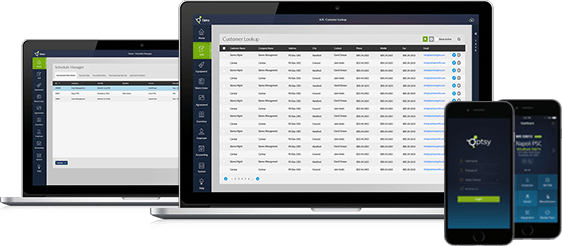
Optsy’s computer service management software gives you full visibility into your repair and maintenance operations, helping you avoid small issues before they become major problems. Your business can manage installations, on-site repairs, preventive maintenance, and client interactions from one platform—making it easier to scale operations, build customer trust, and boost profitability.

Make Life Simpler

Manage your computer service business with less paperwork and more time for hands-on work.

Job Management Software

Track and manage every job, diagnostics, hardware repairs, software updates, upgrades—within the same system. Everything stays organized and visible.

In-Depth Data & Reporting

Get instant insights into your costs, margins, technician efficiency, client trends, and more. Customize reports the way you need them.

Grow with Powerful Tools

From quoting to dispatching to billing to follow-ups, your whole workflow gets integrated. No more juggling multiple tools.

Elevate Customer Satisfaction

Because your team is better organized and responsive, you’ll enjoy increased referrals, repeat business, and stronger client relationships.

Onboarding & Support

Our team helps you get started fast with minimal disruption. Whether it’s customization or training, we’re here to ensure you get the most out of the tool from day one.

Shape Your Computer Service Business

View Order Management
Fixing a computer

Empower Your Business Operations with Smarter Tools

View Order Management
Schedule wiring installations with efficient dispatching systems managed by skilled technicians to enhance productivity.

The complete automation platform for field technicians is built to streamline workflows and elevate the way you manage computer service operations.

Schedule a Free Demo

Smart Scheduling & Efficient Dispatching

View Scheduling Software
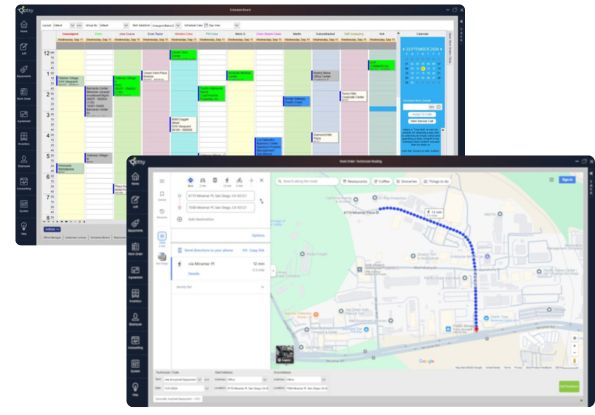
Scheduling software and dispatch for improved efficiency and technician management.

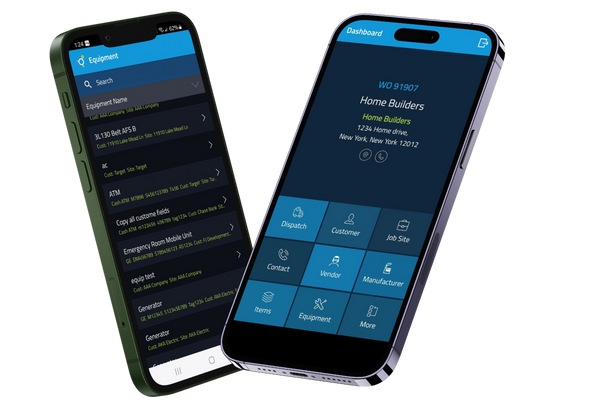
Components of Optsy’s Mobile App

View mobile app
Mobile App with template features for easy job progress

Data Insights That Drive Better Decisions

View Reporting Software
data analytics

Onboarding and Dedicated Client Support

Contact Us

Flexible Contract and Service Agreement Management

service agreement contract setting in place

Centralize your computer service management with one integrated CRM system and increase operational efficiency by up to 40%.

Get Free Demo
computer technician

Optsy Computer Repair & IT Service Software - Frequently Asked Questions

What is Field Service Computer Software?

+

Field service computer software is a powerful tool that helps businesses manage teams of technicians, contractors, or service professionals who work off-site. This type of software combines key features, including job scheduling, dispatching, GPS tracking, work order management, inventory control, and customer communication, all in one centralized platform.

Modern field service utilizes cloud technology and mobile apps to keep teams connected in real-time. Many systems now incorporate predictive analytics to automate tasks, prevent equipment failures, and enhance decision-making. Companies in industries such as HVAC, electrical, plumbing, security, healthcare, and manufacturing rely on this software to enhance efficiency, minimize delays, and deliver superior service to customers.

What Features Should Field Service Software Have?

+

Effective field service software should encompass a comprehensive suite of tools to streamline operations, enhance productivity, and improve customer satisfaction. Essential features include real-time scheduling and dispatching, which allow managers to assign jobs quickly based on technician location and availability. Built-in all types of tracking that help monitor field staff in real time.

Strong inventory management tools are also crucial for tracking parts and equipment, thereby avoiding delays caused by missing stock. A mobile-friendly interface lets technicians access job details, customer history, and update work orders directly from the field. Other valuable features include automated invoicing and payment processing to simplify billing, as well as reporting and analytics to monitor performance and drive smarter business decisions.

Is Field Service Software Cloud-Based or On-Premise?

+

Field service software can be either cloud-based or on-premise, depending on the company’s needs. Most businesses today prefer cloud-based solutions because they offer easier access across locations, automatic updates, mobile compatibility, and lower upfront costs.

However, some companies still choose on-premise field service software for tighter control over data security, deeper customization, or better integration with in-house systems. The right option depends on your IT setup, budget, industry requirements, and the level of flexibility you need.

How does field service software improve efficiency?

+

Field service software enhances efficiency by automating core operations, including scheduling, dispatching, inventory tracking, and real-time communication between office staff and field technicians. It utilizes smart scheduling tools and route optimization to minimize travel time and fuel costs, while ensuring faster job completion. Mobile access enables technicians to receive job details, update statuses, and collect customer signatures directly from the field, eliminating paperwork and delays. It also centralizes data, supports predictive maintenance, and streamlines invoicing—helping companies work more efficiently, reduce errors, and enhance customer satisfaction.

What is the difference between Optsy Field Service Software and other software?

+

Unlike many generic field service platforms, Optsy focuses on what truly matters to growing service businesses’ profitability, customization, and long-term success. We don’t just hand you a one-size-fits-all solution and disappear. Instead, Optsy provides extensive reporting and real-time analytics, allowing you to clearly see where your profits are coming from and where your business operations may need fine-tuning. Our software is fully customizable to fit the unique needs of your company, and our team is with you every step of the way, from setup to ongoing support, to ensure your software works for you. With Optsy, you’re not just buying software; you’re gaining a partner committed to your success.

Does this field service computer software integrate with QuickBooks?

+

Yes, this field service computer software integrates seamlessly with Intuit QuickBooks, making your accounting process faster, easier, and more accurate. Once connected to your existing QuickBooks account, you can generate customized reports using real-time data collected from the field. Invoices are automatically linked to the correct customer profiles, work orders, and job quotes, allowing you to track payments effortlessly and identify overdue balances at a glance.

The integration also includes automatic syncing of technician timesheets, helping you manage payroll with greater efficiency. You won’t have to worry about duplicate entries; everything imports accurately and without error. Whether you’re scheduling jobs, invoicing clients, or reviewing financial reports, this integration keeps your operations organized and ensures your accounting records are always up to date.

Does your field service computer software include a mobile app for technicians in the field?

+

Yes, our field service computer software comes with a powerful mobile app compatible with both Android and iOS platforms. It’s designed for real-time syncing so your data stays current no matter where you’re working whether it’s in the office or out in the field. The app mirrors many of the essential functions of the desktop version, giving you full flexibility and control on the go.

Core features include smart dispatch tools that send tasks and updates directly to your field technicians, keeping them productive throughout the day. The app also supports secure credit card payments via Fidelity Processing, allowing your team to complete jobs and accept payments on-site. This streamlines your operations and helps improve cash flow by eliminating delays between service and payment.

How does field service software improve customer service?

+

Field service software enhances customer service by reducing paperwork and streamlining operations, allowing you to focus more on your customers and less on administrative tasks. With digital tools handling scheduling, dispatching, and invoicing, your team can provide quotes on the spot, take payments in the field, and create accurate estimates instantly right from a mobile device. Real-time updates, access to customer history, and clear communication all contribute to a faster, more personalized service experience. By replacing outdated manual processes with smart technology, your business runs more smoothly, and customers feel the difference in professionalism, responsiveness, and care.

Al T.

I used to have to go into the office every morning 40 miles from my house. Now I just start work right from my house since my schedule is in the app! I love that I put my inventory right into my work orders! Love this app!

Rebecca C.

The best software out there from scheduling the job till ordering the part following up the PO’s etc just the best

Jacob R.

This a one of a kind software with amazing features. I would recommend checking out the reporting as it’s extremely customizable. The customer service is outstanding.

Jennifer D.

How did they pack so many powerful tools into such a nice looking app? I’m very pleased to have this app on the play store now.

Mark S.

We use this software to run a small home services business with around 15 employees and 2 users.

It helps keep our business organized. This software does everything we need it to – scheduling, invoicing, routing, keeping track of labor and parts – I rated the ease of use a little low since it did take a while to get up to speed.

Kim R.

The support staff has always been super knowledgeable and helpful.

I love how user friendly this software is. It took me less than a day to be good at navigating around in the software.

Gary G.

Get the job done, one ticket at a time!

Easy to schedule appointments, collect customer information, and invoicing was a breeze for this software.

Matthew S.

Very Good Support.

Optsy has been incredible. Their team and solutions are amazing. I would highly recommend at least speaking to them to see if it is the best fit for you also. Easy and Integrates well with any existing software in place, like QuickBooks, etc.

Nate A.

All-encompassing Field Service software. Great to manage both techs and customers seamlessly.

Very thorough and in-depth. Can use it as a basic scheduling system, or you can really dig deep and use it to run your entire company. Highly recommend.

Field Service Application Software’s Impact and Efficiency Across Additional Industries

Computer Service Management Software Explore Our News Blogs

using crm for your computer service business

Using CRM for Your Computer Service Business: A Game Changer

July 20, 2023

Every modern computer service firm requires a competitive advantage, which a robust Customer Relationship Management (CRM) system can deliver. A CRM may be a formidable weapon in your business armory, with its ability to streamline procedures and improve customer interactions....

secret weapon to skyrocket your field service biz

Networking: Your Secret Weapon to Skyrocket Your Field Service Biz

July 20, 2023

We’re all in it to grow our field service businesses, whether it’s HVAC, plumbing, or roofing.  But just doing a great job is not enough.  Businesses are built on relationships. Building relationships is the only way to grow your business...

Advance your business future ahead

Let’s schedule a one-on-one demo to explore how we can enhance and expand your business toolkit.

"*" indicates required fields

This field is for validation purposes and should be left unchanged.